Flying Broom AI Generator
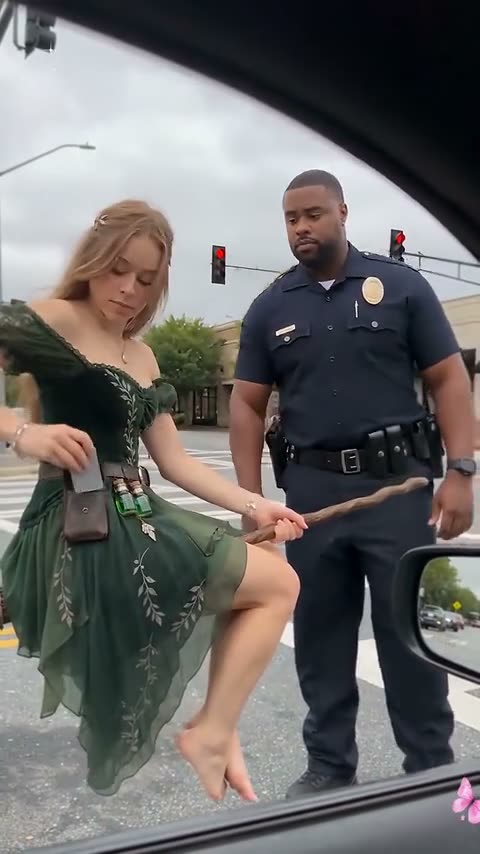
The flying broom AI trend, also called “my ride is here,” is a Halloween clip filmed from a car window: someone sits sideways on a witch's broom, hovering at the intersection, then zooms off down the road — or crashes into a street sign. Upload one photo and MakeMeme makes you the one on the broom.
- One photo
- From 50 credits
- 10s
Watch the Flying Broom AI trend
Make yours
How to make a Flying Broom AI video
- 01
Pick a version: “My ride is here” (you fly off) or the crash landing.
- 02
Upload one clear photo of the rider: you, a friend who agreed, your child, your pet or a character.
- 03
Hit Generate. Your rider takes the broom in the same street, with the same camera moves.
- 04
Download the vertical MP4 and post it with #myrideishere and #flyingbroom.
Which photo works best
You or a friend
- Full length is best — the broom shot shows the whole body, legs included
- Face clearly visible, looking at the camera
- Wear what you want to fly in: everyday clothes or a witch costume
- Just one person in the photo
Your dog or cat
- Whole body in frame, standing or sitting
- Eyes open and in focus
- One pet per photo, on a simple background if you can
Your kid
- Your own child, or one whose parent agreed
- Full length, face clearly visible
- Just your child in the photo
Avoid
- Group photos or several faces
- Photos of other people's children without their parent's OK
- Sunglasses, masks or a hand covering the face
- Heavy filters, blur or a tiny face in a wide shot
- Photos of celebrities or public figures (they're rejected)
Make your version
10s videoCredits come back if a video fails · Photos auto-deleted in 7 days
10 seconds, 480p, 720p or 1080p, vertical 9:16 · usually ready in a few minutes
Why MakeMeme
Why make your Flying Broom AI video with MakeMeme?
One photo, nothing to write
Upload a single photo and hit Generate. No prompt, no template to hunt down, no editing app to learn.
The real clip, not a lookalike
Your photo is recast into the original Flying Broom clip, so the scene, the camera moves and the timing are the ones people know.
Sound already on it
The clip's own audio goes back on your video, lined up with the action. Download it and post — no syncing.
You, your pet or a character
You, your mom, friends who agreed, your own kids, your dog or cat, or a character on the broom. Your video keeps their own face, fur or design, and the clothes from the photo.
Pick your quality
Choose 480p, 720p or 1080p before you start and pay for that one only: 50 credits at 480p, 100 at 720p or 240 at 1080p.
Credits back if it fails
If a video fails, the credits go straight back to your balance. Most are ready in a few minutes, and we email you when yours is done.
Quality & price
Flying Broom AI video quality and price
Every Flying Broom AI video is 10 seconds, vertical 9:16. You pick the resolution in the generator before you start: 50 credits at 480p, 100 at 720p or 240 at 1080p. The credits are taken when the video starts and go back to your balance if it fails.
480p
Standard
Trying the trend and quick posts to TikTok, Reels and Shorts.
50 credits per video
720p
HD
Sharper faces and details when watched full screen on a phone.
100 credits per video
1080p
Full HD
The sharpest version, for big screens, re-edits and compilations.
240 credits per video
Higher resolutions cost more because the AI model renders more pixels for every second of video. The length, format and motion are the same at every resolution.
Pricing
Flying Broom AI pricing
Buy a credit pack once and make Flying Broom AI videos whenever you like. No monthly subscription.
100 credits
2 videos$10one-time
$5.00 per Flying Broom AI video
- 2 × 10-second Flying Broom AI videos at 480p
- Vertical 9:16 MP4, no watermark
- Credits never expire and work on every trend
- Credits back if a video fails
- One-time payment, no subscription
- Most popular
300 credits
6 videos$27one-time
$4.50 per Flying Broom AI videoSave 10%
- 6 × 10-second Flying Broom AI videos at 480p
- Vertical 9:16 MP4, no watermark
- Credits never expire and work on every trend
- Credits back if a video fails
- One-time payment, no subscription
1,000 credits
20 videos$80one-time
$4.00 per Flying Broom AI videoSave 20%
- 20 × 10-second Flying Broom AI videos at 480p
- Vertical 9:16 MP4, no watermark
- Credits never expire and work on every trend
- Credits back if a video fails
- One-time payment, no subscription
Making videos every month? See the monthly plans →
The moment
Your video has the “my ride is here” moment
The flying broom moment is the double take: the camera is filming out of a car window at a traffic stop, and there you are, sitting sideways on a witch's broom, hovering right next to the car like it's the most normal commute in the world — until the light changes and you zoom off down the road.
Your flying broom video keeps that moment, in the same street and with the same handheld camera. Whoever is in your photo is the rider, in the clothes from the photo, so it looks like your mom, your best friend or your dog just caught a broom home. Pick the crash version and the ride ends at a stop sign instead.
- My ride is here: hovering at the intersection, then flying off
- Crash landing: flying down the sidewalk straight into a stop sign
- Everyday clothes or a witch costume — whatever you wear in the photo
About the trend
What is the Flying Broom AI trend?
- What it is
- A CapCut AI template called “My Ride Is Here”: a clip filmed from a car window in which someone sits sideways on a witch's broom, hovering at an intersection, then flies off. A second template ends with the broom crashing into a street sign
- First seen
- Late September 2026; how-to videos for the template passed 800,000 views on TikTok in October 2026
- Where it's popular
- TikTok, Instagram Reels (#myrideishere, #flyingbroom, #witchbroom)
- Sound
- Each clip's own sound — “Long Cool Woman in a Black Dress” by The Hollies on the ride-off — already on your video
- AI model we use
- Seedance 2.5 (ByteDance)
- Video format
- 10 seconds, 480p, 720p or 1080p, vertical 9:16
- Price
- 50 credits at 480p, 100 at 720p or 240 at 1080p per video, refunded if it fails
Background
The template behind the flying broom trend
The flying broom trend started as a CapCut AI template in late September 2026. Its clips copy the look of a phone filming out of a car window, so a witch on a broom idling at a red light reads like something a friend actually caught on camera — which is the whole joke.
The flying broom template took off through how-to videos: by October 2026 several had passed 300,000 views, and one 830,000. A second template followed with a crash ending, the rider slamming into a street sign, and both spread as Halloween posts of moms, grandmas, friends and pets on brooms.
Sources: TikTok — How to do the flying broom trend · Videosi — AI video trends this week · Imageat — TikTok AI trends, October 2026 · #myrideishere on TikTok
FAQ
Flying Broom AI FAQ
What is the flying broom AI trend?
+
The flying broom AI trend is a Halloween TikTok trend from fall 2026, also called “my ride is here.” A clip filmed from a car window shows someone sitting sideways on a witch's broom at an intersection, who then zooms off down the road. People make it from one photo of themselves, their mom, a friend or a pet.
What does “my ride is here” mean in the broom trend?
+
“My ride is here” is the name of the CapCut template behind the flying broom trend, and the joke of the clip: the broom shows up beside the car like a ride you ordered. It's the caption most people post the video with.
How do I make a flying broom AI video?
+
To make a flying broom AI video, pick a version on this page, upload one photo and hit Generate. Whoever is in your photo rides the broom beside the car window and flies off, or crashes into a stop sign, so there's no prompt to write and nothing to film.
How can I fake flying on a broom in real life?
+
Faking flying on a broom used to take green screens and editing. With the flying broom AI trend you only need one full-length photo: the AI makes a realistic video of you riding the broom past a car on a real street, as if a friend filmed it from the passenger seat.
What is the broom crash version?
+
The broom crash version of the flying broom trend is the “ride gone wrong” take: the rider flies down the street toward the camera, hits a stop sign and lands on the sidewalk. Pick “Crash landing” in the generator to make it.
Is there a CapCut template for the flying broom trend? Can I do it without CapCut?
+
CapCut has the “My Ride Is Here” flying broom template, used with the app on your phone. On MakeMeme you don't need any app — upload one photo here in your browser and download the finished video, with no watermark.
Do I need a witch costume?
+
No. In the flying broom video the rider keeps the clothes from the photo, so everyday clothes work and are often funnier. For the classic witch look, upload a photo of yourself in your witch costume and hat.
Can my dog or cat ride the flying broom?
+
Yes. Your dog or cat can ride the flying broom and keeps its own face and fur on it — a cat crashing into the street sign is one of the template's own demo clips. Use a clear photo of the whole pet. Pets can also do the Rumpelstiltskin tip toe.
Can I make one of my mom, grandma or a friend?
+
Yes. Moms, grandmas and best friends on the flying broom are some of the most posted versions — upload a full-length photo of them (with their OK) and they hover outside the car window, then fly off.
Can I make one of my kid?
+
Yes. For the flying broom trend, parents can upload a photo of their own child, who then rides the broom down the street. Photos are deleted after 7 days and the video stays private to your account until you share it.
Is this an AI witch video generator?
+
Yes, for the flying broom AI witch video: your photo becomes a witch riding a broom down a real street. For other AI witch videos, try a witch costume in the AI Halloween Costume generator or the witch walk in Ramalama.
Will it still look like me?
+
Yes. The flying broom rider keeps your face, hair, fur or design and the clothes from your photo, so friends can tell it's you on the broom.
How long is the video, and what format?
+
Your flying broom video is about 10 seconds long and vertical (9:16), the same as the TikTok versions, with each clip's own sound already on it.
What AI is used for flying broom videos?
+
Flying broom creators mostly use CapCut's template. MakeMeme uses ByteDance's Seedance 2.5: whoever is in your photo takes the rider's place in the 10-second clip, at 480p, 720p or 1080p.
Can I put a celebrity on the broom?
+
The flying broom is yours to fill: you, your mom, your best friend, your kid, your dog or a character hovering outside the car window. Photos of real celebrities and public figures aren't accepted.
Is the flying broom AI trend free?
+
Some apps offer the flying broom AI trend as a free trial with a watermark. On MakeMeme each video costs 50 credits at 480p, 100 at 720p or 240 at 1080p, paid from a credit pack, with no watermark, and failed videos are refunded automatically. Most videos are ready in a few minutes, and we email you when yours is done.
What other Halloween AI trends can I make?
+
Besides the flying broom, you can make every Halloween AI trend of 2026 on MakeMeme from a photo: the AI Zombie hug, Ramalama, the Thriller dance, Ghostface, the Monster High filter and more.
What resolution is the Flying Broom AI video, and how many credits does it cost?
+
For the Flying Broom AI video you pick the resolution before you generate: 50 credits at 480p, 100 at 720p or 240 at 1080p. Every resolution gives the same 10-second vertical 9:16 video; higher resolutions are sharper. Failed videos are refunded automatically.
Only upload photos of yourself, of people who have agreed to be in your video, of your own children (or ones whose parent or guardian agreed), of your pets or of characters. Photos of public figures are rejected. MakeMeme isn't affiliated with CapCut or the template's creators.