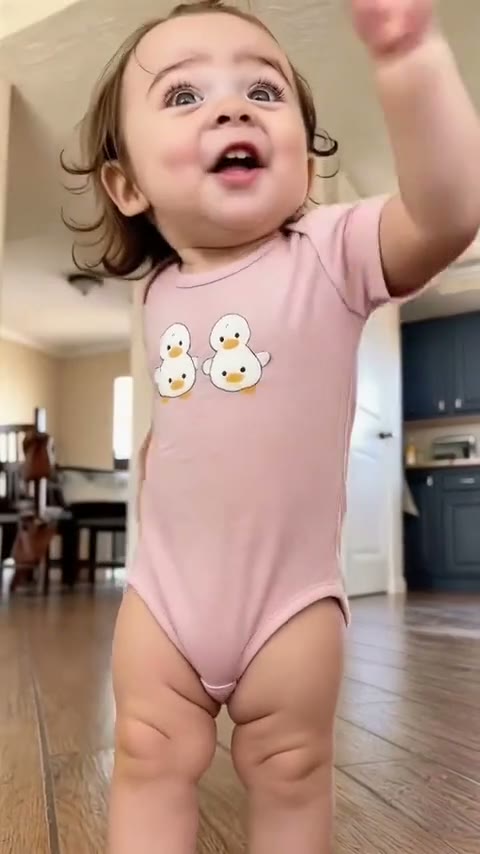
Thank You Baby AI Generator
The Thank You Baby AI trend turns a photo of a baby or toddler into a 15-second dance to the viral “Thank you babeh” sound: bouncing knees, waving arms, a hand to the face and a huge grin. Upload one photo of your child or your pet and MakeMeme makes them do the routine every AI baby video uses, right where the photo was taken, with the sound already on.
- One photo
- From 40 credits
- 15s
Watch the Thank You Baby AI trend
Make yours
How to make a Thank You Baby AI video
- 01
Upload one clear photo of your baby, toddler or pet.
- 02
Hit Generate. They do the Thank You Baby routine — the bounce, the waves, the grin — on the beat, in the room from your photo.
- 03
Download the vertical MP4 with the sound already on it.
- 04
Post it on TikTok or Reels with #thankyoubaby and #babydance.
Which photo works best
Your baby or toddler
- Standing, head to toe in frame works best — the dance is full-length; sitting up works too
- Wherever you like: the video keeps the room from your photo
- Face clearly visible and in focus, ideally looking at the camera
- Daylight or even indoor light, no strong shadows
- Just your child in the photo
Your cat or dog
- Whole body in frame, sitting or standing up
- Eyes open and in focus
- One pet per photo, on a simple background if you can
- Want the wig look? Put the wig on for the photo — the video keeps it
A baby photo of you
- Photograph or scan the print flat, in good light, without glare
- Crop it so only you are in it
- The sharper the face, the better the video
Avoid
- Photos of other people's children without their parent's OK
- A newborn lying down: the dance needs a baby who's sitting or standing up
- Group or family photos with several faces
- Blurry photos, heavy filters or a tiny figure in a wide shot
- Photos of celebrities or their children (they're rejected)
Make your version
15s videoCredits come back if a video fails · Photos auto-deleted in 7 days
15 seconds, 720p or 1080p, vertical 9:16 · usually ready in a few minutes
Why MakeMeme
Why make your Thank You Baby AI video with MakeMeme?
One photo, nothing to write
Upload a single photo and hit Generate. No prompt, no template to hunt down, no editing app to learn.
The real moves, your own scene
Your photo does the original Thank You Baby routine, so the moves and the timing are the ones people know, in your own place.
Sound already on it
The clip's own audio goes back on your video, lined up with the action. Download it and post — no syncing.
Your baby, toddler or pet
Your own little one, a child whose parent agreed, an old baby photo of you, or your cat or dog. Your video keeps their own face, hair or fur and outfit.
Pick your quality
Choose 720p or 1080p before you start and pay for that one only: 40 credits at 720p or 60 at 1080p.
Credits back if it fails
If a video fails, the credits go straight back to your balance. Most are ready in a few minutes, and we email you when yours is done.
Quality & price
Thank You Baby AI video quality and price
Every Thank You Baby AI video is 15 seconds, vertical 9:16. You pick the resolution in the generator before you start: 40 credits at 720p or 60 at 1080p. The credits are taken when the video starts and go back to your balance if it fails.
720p
HD
Sharper faces and details when watched full screen on a phone.
40 credits per video
1080p
Full HD
The sharpest version, for big screens, re-edits and compilations.
60 credits per video
Higher resolutions cost more because the AI model renders more pixels for every second of video. The length, format and motion are the same at every resolution.
Pricing
Thank You Baby AI pricing
Buy a credit pack once and make Thank You Baby AI videos whenever you like. No monthly subscription.
100 credits
2 videos$10one-time
$4.00 per Thank You Baby AI video
- 2 × 15-second Thank You Baby AI videos at 720p, 20 credits left over
- Vertical 9:16 MP4, no watermark
- Credits never expire and work on every trend
- Credits back if a video fails
- One-time payment, no subscription
- Most popular
300 credits
7 videos$27one-time
$3.60 per Thank You Baby AI videoSave 10%
- 7 × 15-second Thank You Baby AI videos at 720p, 20 credits left over
- Vertical 9:16 MP4, no watermark
- Credits never expire and work on every trend
- Credits back if a video fails
- One-time payment, no subscription
1,000 credits
25 videos$80one-time
$3.20 per Thank You Baby AI videoSave 20%
- 25 × 15-second Thank You Baby AI videos at 720p
- Vertical 9:16 MP4, no watermark
- Credits never expire and work on every trend
- Credits back if a video fails
- One-time payment, no subscription
Making videos every month? See the monthly plans →
The moment
Your video has the Thank You Baby dance
Every AI baby video in the trend does the same 15 seconds: a wobbly bounce at the knees, arms out and waving, a hand pressed to the cheek, a fist pump and a giant grin straight at the camera, all on the beat of “Thank you babeh”.
Your video keeps that routine and its timing. Your child or pet does the dance right where the photo was taken, keeping their own face, hair, outfit and room, with the sound on top. No filming, no getting a toddler to cooperate — one photo is enough.
- Babies and toddlers: the classic version of the trend
- Cats and dogs: the same bounce and wave, keeping your pet's own face and fur
- Older kids and grown-ups work too — it just isn't as cute
About the trend
What is the Thank You Baby AI trend?
- What it is
- The “Thank you babeh!!” clip by the 50/50 Twins, which became a dance sound on TikTok. AI versions use a CapCut template to make babies and toddlers do one 15-second routine to it
- First seen
- September 30, 2026 (the 50/50 Twins clip); AI baby versions spread from October 9, 2026
- Where it's popular
- TikTok, Instagram Reels (#thankyoubaby, #thankyoubabeh, #babydance)
- Sound
- The sped-up “Thank you babeh” sound, already on your video
- AI model we use
- Kling 3.0 Motion Control (Kuaishou)
- Video format
- 15 seconds, 720p or 1080p, vertical 9:16
- Price
- 40 credits at 720p or 60 at 1080p per video, refunded if it fails
Background
The sound behind Thank You Baby
On September 30, 2026, the 50/50 Twins posted a clip of themselves saying “Thank you babeh!!”. It became a sound, with families, couples and creators posting their own takes.
In early October a CapCut template turned it into an AI trend: one photo of a baby or toddler, and they do a bouncing, waving 15-second dance to the sped-up sound. Tutorials on how to make it spread within days.
Sources: 50/50 Twins on TikTok
FAQ
Thank You Baby AI FAQ
What is the Thank You Baby AI trend?
+
It's a TikTok trend from October 2026. Parents use AI to make a photo of their baby or toddler dance to the viral “Thank you babeh” sound, all doing the same bouncing, waving routine. The sound comes from a clip by the 50/50 Twins.
Where does “Thank you babeh” come from?
+
From a video by the 50/50 Twins posted on September 30, 2026. The line became a TikTok sound, first for people dancing themselves and then for AI baby dances.
Is it “Thank You Baby” or “Thank You Babeh”?
+
Both — it's the same trend. The twins say “babeh”, so the sound is often spelled that way, and people search for it as Thank You Baby, Thank You Babeh or the AI baby dance.
How do I make my baby do the Thank You Baby dance?
+
Upload one photo of your child on this page and hit Generate. Your child does the same routine as every AI baby video in the trend, in their own room, with no CapCut template to find and no prompt to write. The sound is already on the result.
Is there a CapCut template for Thank You Baby? Can I do it without CapCut?
+
Yes, CapCut has a Thank You Baby template: you find the template video on TikTok, open it in the CapCut app and add your photo. On MakeMeme you don't need CapCut or any app — upload one photo here in your browser and download the finished video, with no watermark.
My baby can't stand yet. Will it work?
+
Yes, if they can sit up: a photo of them sitting works, though a standing, head-to-toe photo gives the best dance. A newborn lying down doesn't work well, because the routine needs a body that's upright.
Will it still look like my baby?
+
Yes. Your child keeps their own face, hair and outfit from the photo, and the dance happens in the room where it was taken. Only the moves come from the trend.
Can twins or two kids be in one video?
+
No, each video has one child or pet. For twins or siblings, make one video each — or post them side by side.
Can I use a baby photo of myself?
+
Yes, and it's a fun one: upload an old baby photo of you, scanned or photographed flat in good light, cropped so only you are in it. You'll be doing the Thank You Baby dance as a baby.
Can I use my pet?
+
Yes. Your pet keeps its own face and fur and does the same dance. Use a clear photo where the whole body is visible. For the dog-wig look, put the wig on for the photo — the video keeps it.
What's the sound? Can I change it?
+
It's the sped-up “Thank you babeh” sound from the 50/50 Twins, already on your video and lined up with the dance. You can keep it, or pick a different sound when you post.
Is it safe to upload my child's photo? Who can see the video?
+
Only upload photos of your own child, or of a child whose parent agreed. Photos are used only to make your video and are deleted automatically after 7 days. The finished video is private to your account — nobody else sees it until you download and share it.
What AI is used?
+
MakeMeme uses Kling 3.0 Motion Control: your photo does the same 15-second routine as the CapCut template, in vertical 9:16 at 720p or 1080p.
Is the Thank You Baby AI trend free?
+
Some apps offer a free trial with a watermark. On MakeMeme each video costs 40 credits at 720p or 60 at 1080p, with no watermark, and failed videos are refunded automatically. Most videos are ready in a few minutes, and we email you when yours is done.
What resolution is the Thank You Baby AI video, and how many credits does it cost?
+
You choose before you generate: 40 credits at 720p or 60 at 1080p. Every resolution gives the same 15-second vertical 9:16 video; higher resolutions are sharper. Failed videos are refunded automatically.
Only upload photos of your own child, of a child whose parent or guardian agreed, or of your pet. Photos of public figures and their children are rejected. MakeMeme isn't affiliated with the 50/50 Twins or CapCut.